
01 / Ramadan Planner
Ramadan Planner app icon01Ramadan Planner

Thirty days, with intention.

A free, offline Ramadan companion. Salah and dhikr checklists, a Quran tracker, the dua of the day and a progress summary, all kept on your device.

  • Android
  • ·Version 1.0.5
  • ·Free
  • ·Works offline
  • ·AR · BN · EN
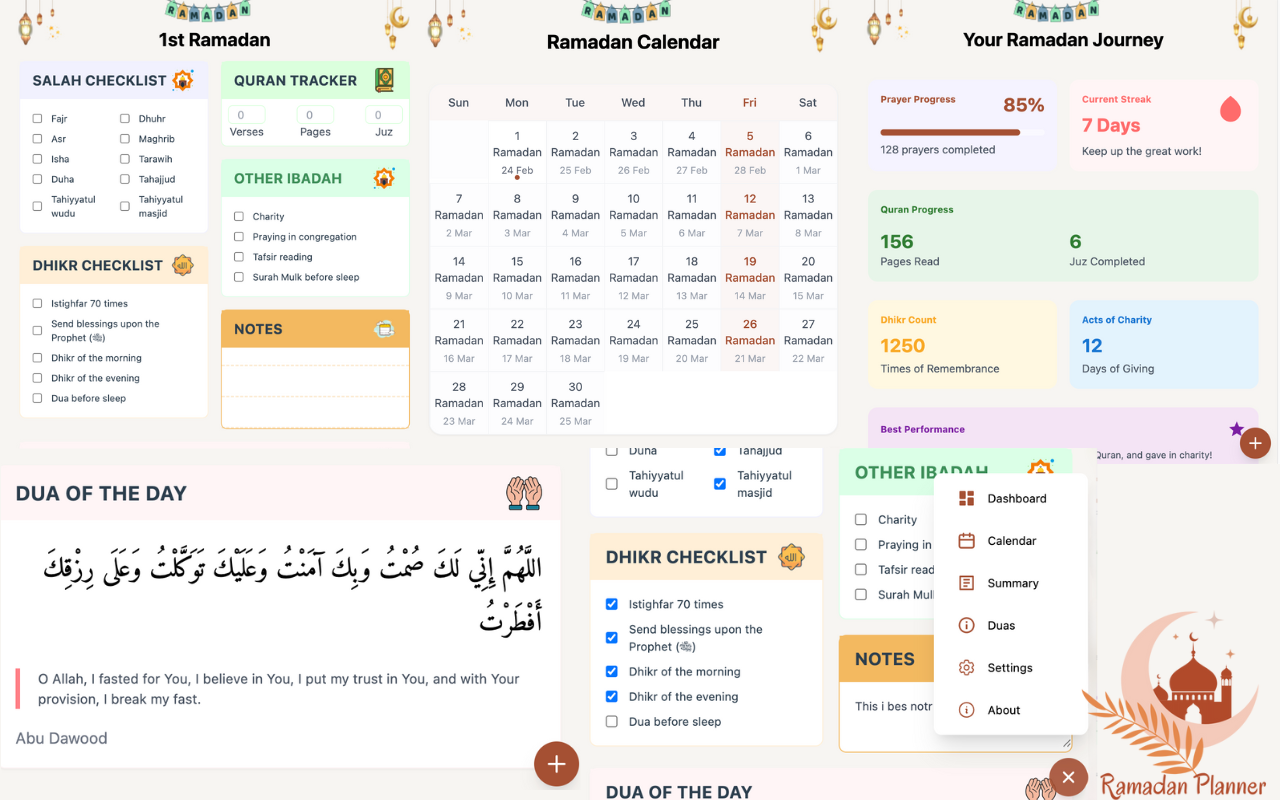
Ramadan Planner dashboard: salah checklist, Quran tracker, dhikr checklist, calendar and progress summary
Dashboard — your Ramadan journeyScreenshot
02 / Features

Everything a Ramadan day asks of you.

Six small panels instead of six apps. Open it once in the morning, once at night, and the month keeps itself in order.

Prayer01
salah checklist — day 18
  • Fajr04:52
  • Dhuhr12:14
  • Asr15:41
  • Maghrib18:21
  • Isha19:48
7-day streak4 / 5 today

Five a day, every day

Tick off Fajr to Isha, plus Tarawih, Tahajjud and the sunnah prayers. Streaks show at a glance how consistent the month has been.

Salah checklist
Reading02
quran tracker
1,984
Verses
156
Pages
6
Juz
Khatm pace20 pages a day to finish

Finish the Quran, on pace

Log verses, pages and juz as you go. A thirty-day grid shows where you are and whether a khatm is still within reach.

Quran tracker
Remembrance03
dhikr checklist
1,250times of remembrance
  • Istighfar 70 times
  • Salawat upon the Prophet ﷺ
  • Dhikr of the morning
  • Dhikr of the evening
  • Dua before sleep

Morning and evening, remembered

Istighfar, salawat, the daily adhkar and your dua before sleep, in one list with a running count for the month.

Dhikr checklist
Daily04
dua of the day — 18 ramadan

اللَّهُمَّ إِنِّي لَكَ صُمْتُ وَبِكَ آمَنْتُ وَعَلَيْكَ تَوَكَّلْتُ وَعَلَى رِزْقِكَ أَفْطَرْتُ

O Allah, I fasted for You, I believe in You, I put my trust in You, and with Your provision I break my fast.

Abu Dawood

One dua, every day

A short supplication each day in Arabic with its translation and source, from the iftar dua on the first night to the last.

Dua of the day
Planning05
ramadan calendar
SuMoTuWeThFrSa
123456789101112131415161718192021222324252627282930
Last ten nightsFridays marked

Thirty days, laid out

Every Ramadan day with its Gregorian date, Fridays marked, the last ten nights highlighted, and your notes attached to each day.

Ramadan calendar
Insight06
your ramadan journey
Prayer progress
85%
128 prayers completed
Current streak
7 days
keep it up
Quran
156 pages
6 juz completed
Charity
12 days
of giving
Best day: 27 Ramadan — all prayers, 2 juz, and charity

See the month add up

Prayer completion, current streak, pages read, dhikr count and days of charity, summarised so the effort stays visible.

Progress summary
03 / Why

Built for the month, not for your data.

Most habit apps want an account, a subscription and your attention. Ramadan Planner wants the opposite: open it, tick the box, get back to the day.

A

Your data stays with you

Everything is stored on your device. No account, no server, no analytics on your worship. Export or delete it any time.

Read the privacy policy
B

Free, with nothing locked

No premium tier, no ads, no trial that runs out in week two. Built as a contribution to the Ummah, and it stays that way.

About GuideAI
C

Works without a signal

Checklists, tracker, calendar and duas all work offline. Open it at suhoor in the kitchen or at the masjid after tarawih.

04 / Get it

On your phone tonight.

The Android app is available as a direct download while the Play Store listing is in closed testing. Install takes about a minute.

Direct downloadv1.0.5
Download APK Verified build · v1.0.5
Security assurance
  • No third-party APIs
  • Completely offline
  • No data collection
  • Open source code
  • Regular updates
What's new in v1.0.5
  • Multi-language
    Arabic, Bangla and English
  • Share progress
    Post your month as an image
  • Day change
    Better detection at midnight
  • Notifications
    Smoother and more reliable
Coming soon on
Google Play Store
Join the beta
Install≈ 1 minute
  1. 01Download the APK from the link
  2. 02Open your device Settings
  3. 03Allow installs from your browser (“Install unknown apps”)
  4. 04Open the downloaded APK
  5. 05Review the minimal permissions
  6. 06Install and launch the app

Having trouble? Contact support.

05 / Beta
Testers wanted

Help it reach the Play Store.

Google requires a closed test before a new app can go public. Join it, use the planner for a couple of weeks, and the next person finds it in the store instead of a download link.

Why test04
  • Early access
    Try new features before anyone else.
  • Shape the product
    Your feedback goes straight into the next build.
  • Updates from Play
    Get releases through the Play Store instead of APKs.
  • Direct support
    Priority replies from the people who build it.
How to join05
  1. 01Message us by email or Facebook
  2. 02Share the Gmail address you use on Play
  3. 03Receive an invitation link
  4. 04Join the test through the Play Store
  5. 05Install, and tell us what you think
06 / FAQ

Good questions.

Still unsure about something? Write to contact@guideai.online.

01Is Ramadan Planner free?

Yes, completely. There is no premium tier, no ads and no trial. It is built by GuideAI as a contribution to the Ummah and stays free.

02Does it need an internet connection?

No. Checklists, the Quran tracker, the calendar and the duas all work offline. Only the optional Telegram reminders need a connection.

03Where is my data stored?

On your device only. The app has no account and no server. You can export your data in a readable format or delete all of it with one tap. See the privacy policy for the details.

04Which languages does it support?

Arabic, Bangla and English. Switch between them in the app settings at any time.

05Why is it an APK and not on the Play Store yet?

Google requires a closed test with real users before a new app can be listed publicly. Until that test is done, the Android app is available as a direct download. Join the beta to help it get there.

06Is the APK safe to install?

The build uses no third-party APIs, collects no data and works fully offline. Android will ask you to allow installs from your browser because the file does not come from the Play Store; that prompt is about the source, not about the app.

07Is there an iPhone version?

Not yet. The app is Android first, with a Chrome extension for the desktop. Write to us if an iOS version would help you and we will let you know when it is on the way.

08How do the Telegram reminders work?

Start the Ramadan Planner bot on Telegram and it sends prayer-time and daily reminders. Only your Telegram ID is stored, so the bot knows where to send them, and you can stop at any time.

08 / Get started
Free · works offline · no account

Begin the month ready.

Install the app before the first fast, set your prayer times, and let the checklists carry you through to Eid. Found a bug or have an idea? Tell us — that's how the next version gets better.